Unexpected Benefits: How Marketing Jargon Obscures Use Cases in Web Development
Posted:
12/10/2025
Categories:
software
,
webdev
- paul i need help
- the svgs are broken and i don't know how to get code formatting to work
- return book
In a sea of buzzwords and marketing lingo, determining what the hot new technology actually does, and more importantly, whether your application actually needs it, can feel Sisyphean. Learning the basics of how a service works is a boulder worth rolling, because sometimes these tools become useful in ways you’d never expect. This is one such case, in which a tool designed to solve a problem we don’t have was useful for a problem it wasn’t designed to solve.
Wanderlust: Deploying a Backend Heavy Web App
Wanderlust is a routing engine, meaning that at its core, it provides the user with a plausible route from point A to point B. Apple and Google invest a huge amount of resources into providing the most time efficient route possible, using complex algorithms to uncover shortcuts previously privy only to locals. If you’ve noticed an uptick in traffic on smaller roads where you live, these services may be the reason.
The Wanderlust team (which included James, but not Redding) elected to forgo efficiency entirely, instead hoping to generate the most enjoyable route. Their focus was on pedestrians and cyclists, groups most likely to tolerate a few extra minutes of travel time in exchange for a more pleasant experience. This meant they needed complete control over the routing algorithm, with the ability to assign edge weights based on whatever factors they wanted (e.g. quiet streets, scenic trails, and walks through parks).
It was with this purpose in mind that they elected to use a PostgreSQL geospatial database, allowing them access to the PGRouting library. PGRouting allows the user to set edge weights manually, letting the developers create their own secret formula for the most pleasant routes, a process of trial and error that probably deserves its own post.
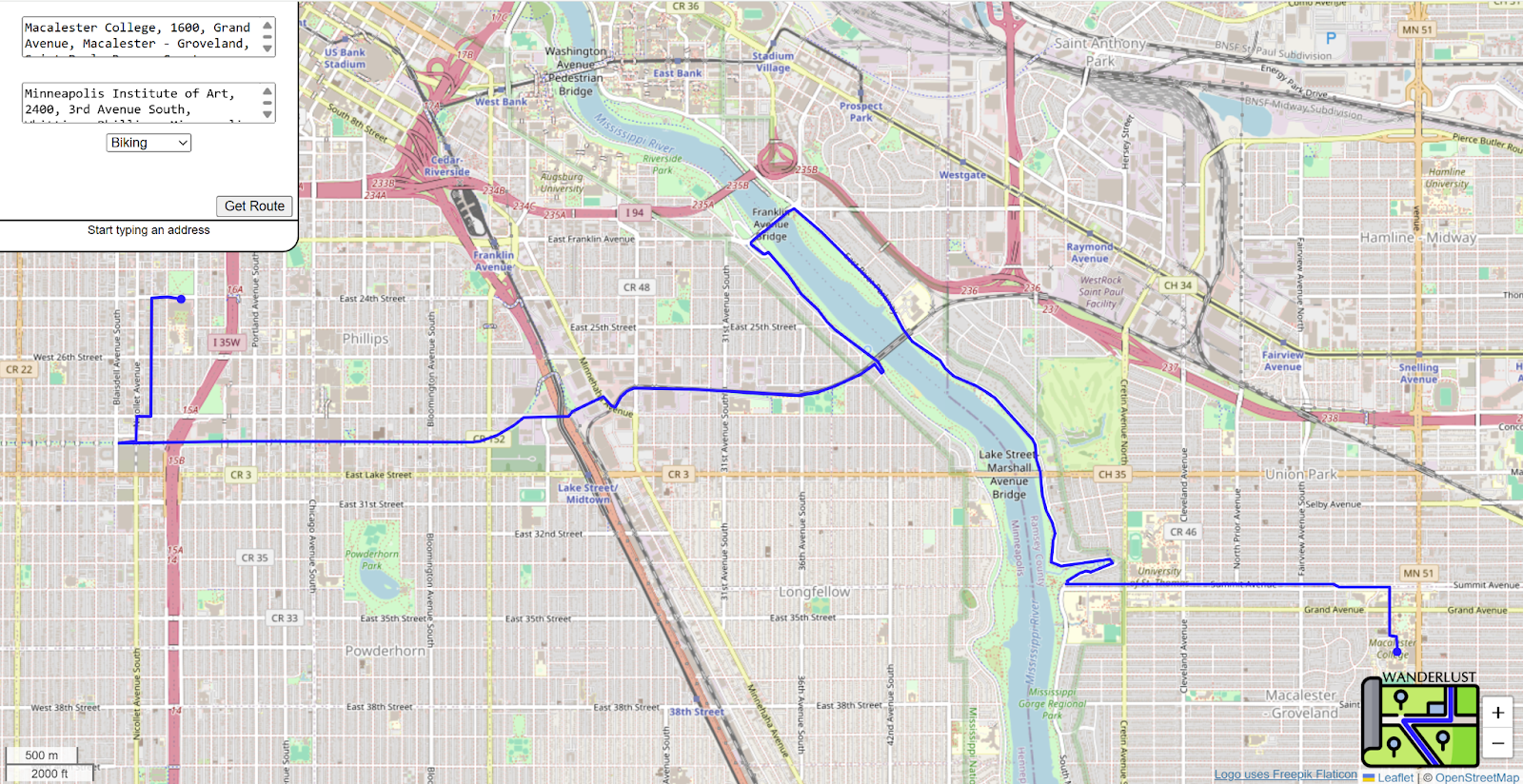
When it works, it looks like this:
Although sometimes it looks like this:
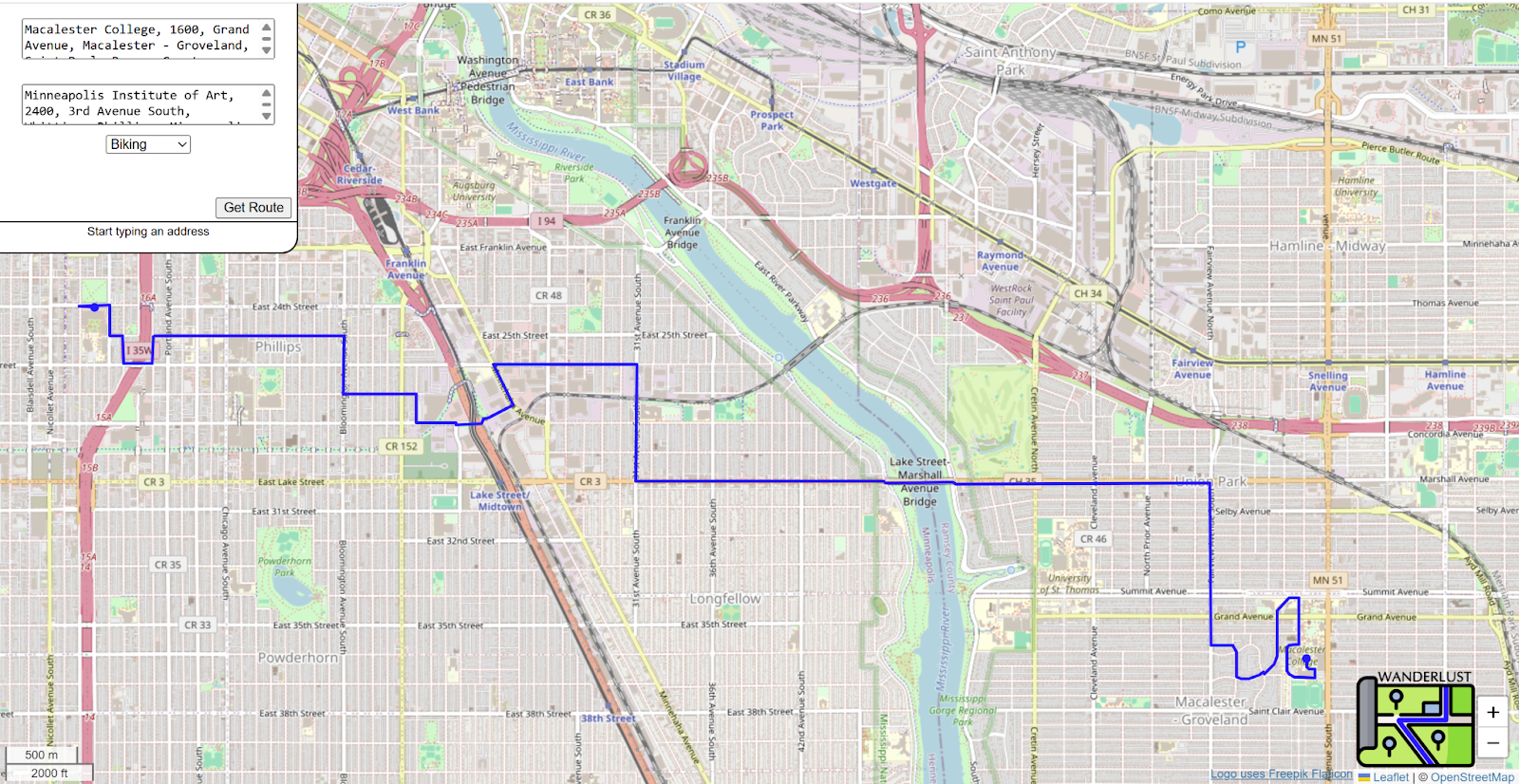
What you're seeing in these images is a basic frontend using Leaflet to approximate a routing service UI. This frontend is written as a Javascript-heavy static SPA (single page application) which turns user input into coordinates readable by the database and displays routes. A small Python HTTP server handles communication between the webpage and the database.
The Road to Supabase
Given our nonexistent budget, our first priority was finding our database a home with a free tier that suited our needs. It turns out selecting suitable tools given these restraints is a problem deserving of its own post, which you can find here. We settled on a managed Postgres service called Supabase for our backend, mostly because it provided the space we needed while affording us enough control over our data to not feel hamstringed.
Managed databases fit into the larger Software as a Service industry. Optimization, storage, compute, and scaling are handled by the provider, allowing the user to focus on their project’s functionality. We control what data is put on our server, and we’re given access points to query that data, but everything else is a black box. We don’t have to deal with the nitty gritty of how exactly data is stored and compute is allocated, but sometimes Supabase behaves in ways we don’t expect.
So What About the Server?
Let’s talk a little bit about the data pipelining of the Wanderlust prototype. From the static frontend your chosen locations are geocoded into latitude and longitude and sent via HTTP to a RESTful API, which makes the database calls to Postgres, where the PostGIS and pgRouting calculations happen.
Deploying the server as written wasn’t an option (the framework used in the prototype isn’t web-ready), so we were in the perfect position to switch deployment strategies. Enter edge functions: a Supabase tool that can do the work of a RESTful API, is included in our Supabase plan, and has enough flexibility that we don’t need to reveal our secrets on our frontend.
Edge Functions and Serverless Computing: A Brief Introduction to Web Dev Lingo
Serverless:
Serverless computing is a confusing name for a deployment paradigm where your code runs on someone else’s server, and none of the server maintenance code is your responsibility. You supply code that runs when interacted with, your cloud vendor decides when that code starts up and shuts down based on user interaction.
Edge function:
Edge functions are serverless functions run at the edge, i.e. they are deployed to a CDN (Content Delivery Network) geographically close to your user. The geography of the internet is affected by real-world geography but not defined by it, so code being “close” to a user is measured in network hops.
Transaction pooler
There are a few different ways for a client to connect to a Postgres database. One is a direct connection: a persistent connection with the database that is maintained until it is closed. This is the fastest for persistent connections but opening and closing the connection is slow and resource intensive. A session pooler serves as a middleman which offers some management to a direct connection, such as the ability to reroute to different databases, but a connection is still open until it is manually closed. Lastly is transaction pooling, where the middleman pooler maintains a certain amount of persistent connections but doesn’t activate them until a database action is actually being performed. This is much faster for brief transient connections because a limited number of connections can serve more clients.

Supabase offers edge functions through the Deno javascript runtime. Developers can write functions in javascript that run close to the user. This is helpful if there are functions you need performed that don’t require accessing the PostgreSQL database, such as authentication or webhook reception, and you want these functions performed closer to the user (and therefore with lower latency) than if they needed to connect to the main database. Supabase manages these connections using a server side transaction pooler, creating a serverless environment.
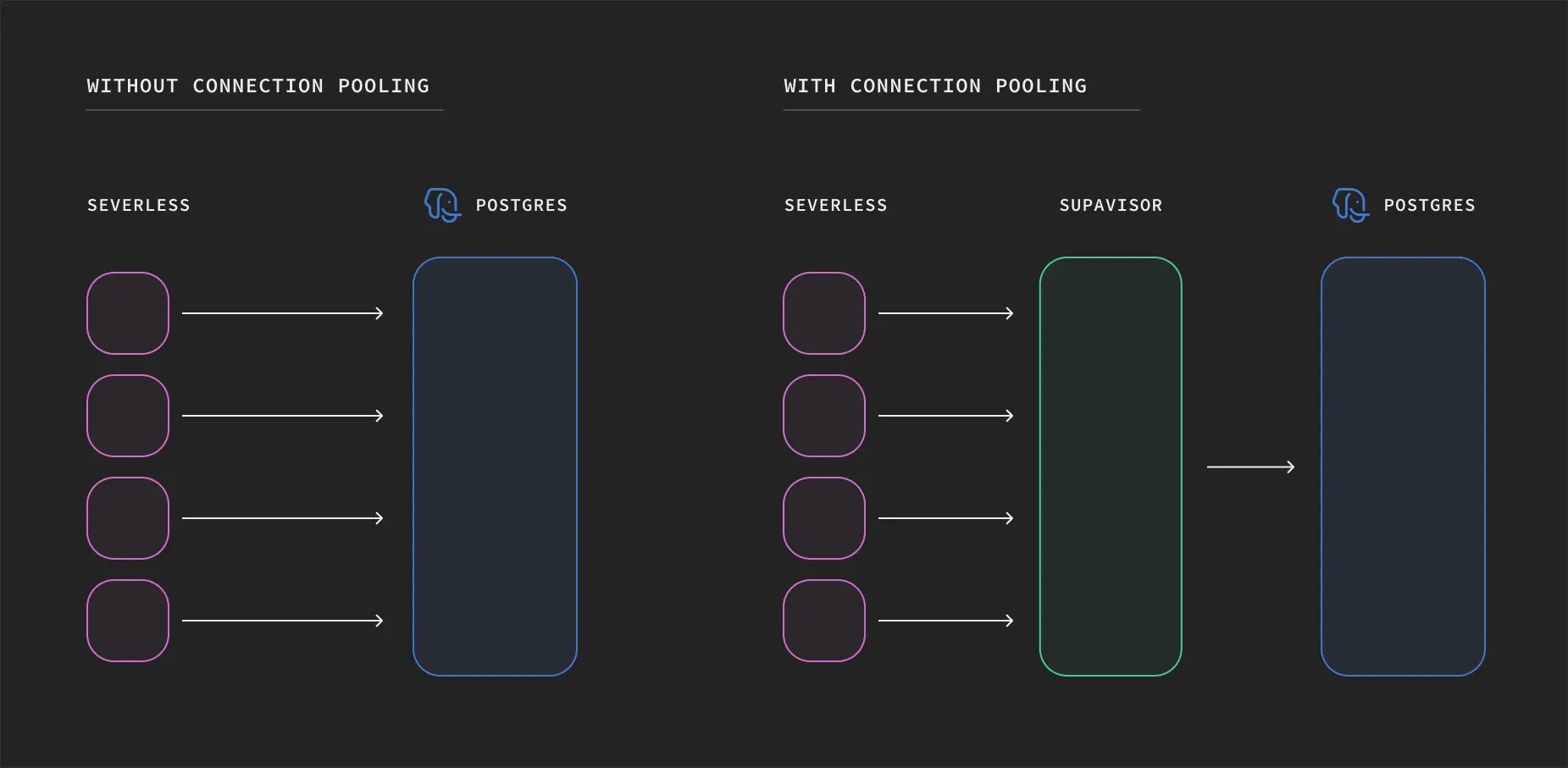
(Or should we say “severless” environment?)
So How Are These Things Useful to Us Anyway?
At first glance, edge functions seem completely irrelevant to our use case. Every interaction between a Wanderlust user and the database is a request for a route. While edge functions can be run in a location that is close to the user, our database is far less mobile. Every routing query is ending up in the same place, and the speed advantage is entirely lost.
At least, until you take another look at our project pipeline. Right now the user enters data into our SPA, which is then passed to our python server, which formulates a query for the database. The chart looks like this: Webpage → Python Server → Database. Using edge functions, that becomes: Webpage → Python Server → Edge Function → Database. We’re just adding an extra step. Except… everything that our server can do, edge functions can also do. Rather than sending requests to a permanently running server that we host in some fixed location, our SPA can send requests to a nearby Supabase node, then Supabase can process them for us.
Now, our chart looks like this: Webpage → Edge Function → Database. The number of links is the same, but remember, the connection to the edge function is always the shortest distance possible. We’ve gone serverless and gained speed.
The intended client for edge functions is not browser code, so none of the easy to find documentation included some crucial handlers for browser connections. Buried in a GitHub repository of code examples is a sample edge function that handles CORS. Notably, your clients’ browser sends a CORS pre-flight request, which is an auto-generated HTTP request of type OPTIONS. If the server isn’t set up to accept that pre-flight request the actual request won’t be sent. In Deno that looks like this:
if (req.method === 'OPTIONS') {
    return new Response('ok', { headers: corsHeaders })
  }
These are the CORS headers we used, which allow traffic from anywhere on the web (this can be limited based on your needs and preferences):
const corsHeaders = {
  'Access-Control-Allow-Origin': '*',
  'Access-Control-Allow-Headers': 'authorization, x-client-info, apikey, content-type'
};
And you also need to send those access headers with each response for a browser to read the response:
return new Response(JSON.stringify(data), {
      headers: { ...corsHeaders, 'Content-Type': 'application/json' },
      status: 200,
    })
  } catch (error) {
    return new Response(JSON.stringify({ error: error.message }), {
      headers: { ...corsHeaders, 'Content-Type': 'application/json' },
      status: 400,
    })
  }
At first, it seemed like this approach worked! Requests were being sent directly from the SPA and our edge function was spitting out a valid route. However, before long, it became apparent that Supabase wasn’t thrilled with our ingenuity.
One of the drawbacks of software as a service is that when you’re using a tool wrong, it rarely lets you know upfront, instead resorting to guerilla tactics. We noticed that, seemingly randomly, our route requests would fail. Rather than tell us why, Supabase was content with displaying 500 errors carrying no useful information.

(It felt a lot like this)
It turns out that edge functions are built for small requests. When they do connect to the database, they aren’t expected to do so for long. An SQL function invoked by an edge function is invoked using the “anon” role’s API key, baked into Deno’s environment variables.
const supabase = createClient(Deno.env.get('SUPABASE_URL') ?? '', Deno.env.get('SUPABASE_ANON_KEY') ?? '');
This is the only browser safe access point, offering safety features such as row level security and a 3 second timeout. Unfortunately, calculating a route is not exactly lightning fast, and ends up slower 3 seconds about two thirds of the time. Luckily, Supabase allows us to modify this timeout through an internal sql query that looks like this.
ALTER ROLE anon SET statement_timeout = '1min';
Anytime you find yourself modifying internal config values, it’s a good indicator that you are trying to do something outside of a service's core intended functionality. Even the less secure “service” role, the only alternative available from an edge function, defaults to an 8 second timeout. Our function is doing something completely unexpected, and possibly ill advised, but within our project architecture, it’s the path that makes the most sense.
Lessons:
Over the development of Wanderlust we learned a lot about the rollercoaster of cloud computing, and how cloud services can assist or impede the development of a software project. Here are some of the lessons we learned:
Explore How Things Work
Despite their frustrating quirks, edge functions were a net positive for our project. Taking the time to understand what buzzword services actually do is worth it. The solution to your problems may lie nearby, albeit beneath several layers of buzzwords and jargon.
Be Self Sufficient
That being said, when issues do arise, expect to rely on yourself. The developers of the software you’ve adopted may not have considered your use case in the first place, let alone taken time to write error messages for when you screw up. It can be difficult to diagnose problems when the tool you're using is sequestered behind glossy UIs and exciting looking buttons.
Seek Out Documentation
Some documentation exists to convince non-technical product leads to invest in a product and are not helpful for developers. This means that sometimes a product has hidden use cases beyond how it’s documented. That developer facing documentation is out there! Go looking for it. (And if it’s not, consider a different service.)